 DomCop
Have you ever sat down to update your website only to realize you have no clue where you actually bought your domain? It happens more often than you think. Maybe you set it up years ago, or perhaps someone else handled it for you. Now, you need to point your DNS to a new host or renew the registration before it expires, but you are stuck at the first step. I have been in this exact spot.
The good news is that finding your domain registrar is actually very fast. Here is how I find that information instantly.
How to Find Your Domain Registrar?
- Use the ICANN Lookup tool.
- Use Whois.com for a quick check.
- Search with DomainTools.
All three options will help you find your domain registrar name in seconds.
Method 1: Use the ICANN Lookup Tool
The most reliable way to find your domain registrar is through the ICANN Lookup tool. ICANN is the organization that oversees all domain names on the internet, so their data is the gold standard.
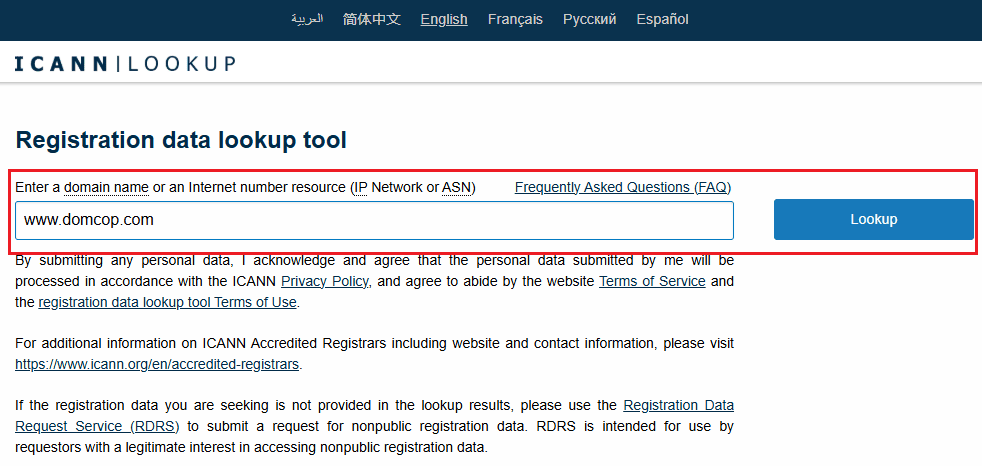
First, go to lookup.icann.org. You will see a simple search box. Type your domain name into that box and click the Lookup button. You do not need to add “www” or “https” at the start.
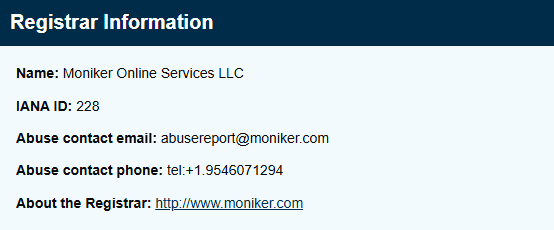
Once the page loads, scroll down to the Registrar Information section. There, you will see a field labeled Name. This is the company where your domain is currently registered.
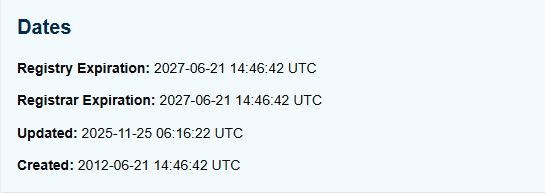
I also suggest looking at the Expiration Date while you are on this page. This tells you exactly when you need to pay for your next renewal so you do not lose your web address.
If you see names like GoDaddy, Namecheap, or Google, that is your registrar. If the name looks unfamiliar, it might be a wholesale provider, but it still gives you a solid lead to follow.
Method 2: Using Whois.com for a Quick Check
Another great tool I use is Whois.com. It works very similarly to the official lookup but is a bit more straightforward if you just want the basic facts without any extra technical layers. This site is essentially a public record that lists the registration details for every active domain name.
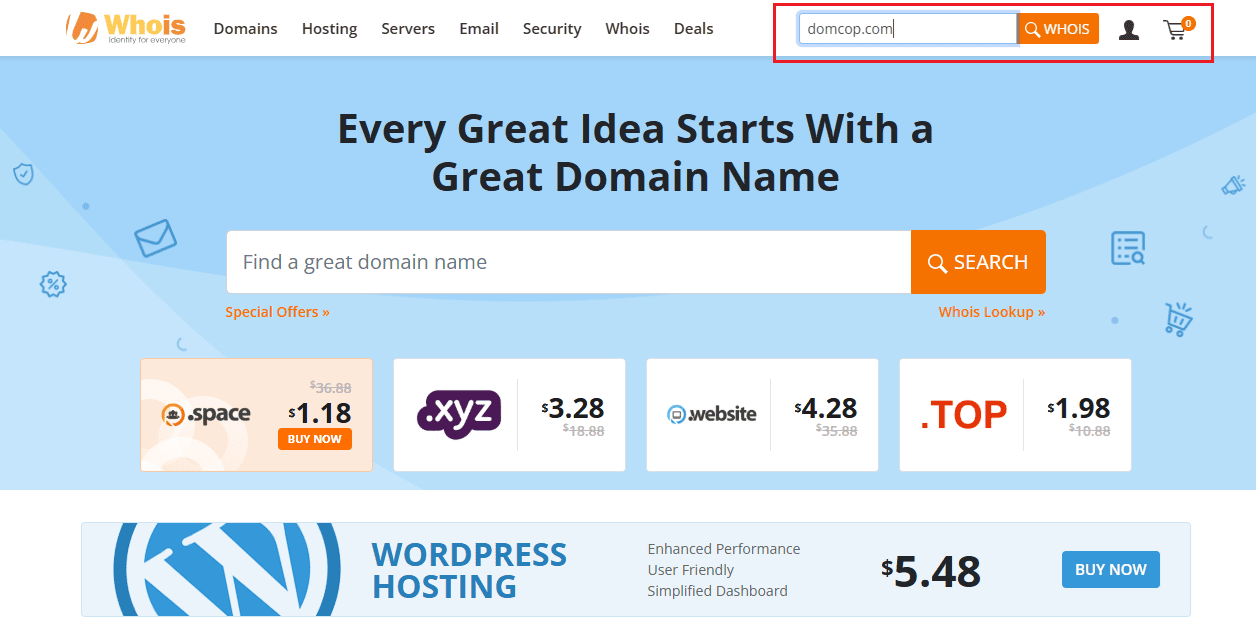
When you land on the homepage, ignore the big search bar in the middle; that is only for buying a new name. Instead, look at the top right of the page for the search box. Type in your domain and click the button.
You will see a summary of your domain status immediately. The most important line is the one labeled Registrar. This is the company you pay every year to keep your name active.
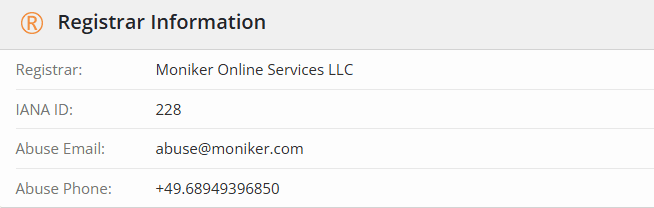
While you are here, you might notice that your personal contact info is hidden. You will often see a message saying the data is “redacted for privacy.” This happens if you have a privacy shield active. Even if your personal details are hidden, the registrar and the name servers will always be visible. This is a quick way to see if your domain is registered with one company but pointed to a different hosting provider.
Method 3: Searching with DomainTools
A third reliable option I often use is DomainTools. This site is a very popular choice for anyone who needs to quickly pull up registration data without any extra steps. It works as a massive search engine specifically for domain names and their history.
To use this, simply go to whois.domaintools.com. Right at the center, you will see a search bar where you can enter your domain name.
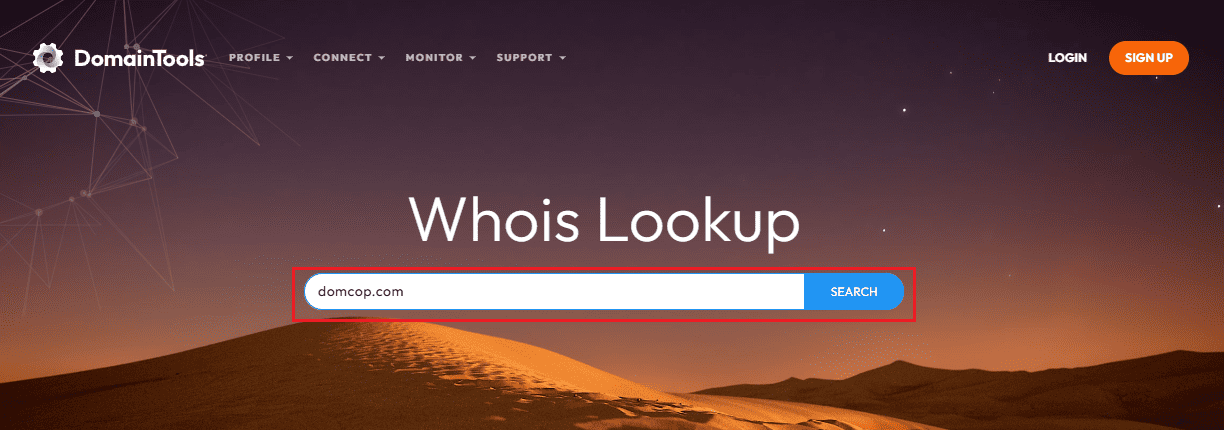
Once you hit enter, the site generates a report that clearly lists the Registrar. This is the company that currently manages your domain registration.
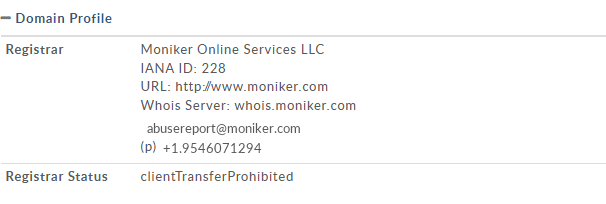
What I find helpful about this specific tool is how it displays the IP Address and IP Location right alongside the registrar info. This is useful if you are trying to figure out not just who you bought the domain from, but also where your website is physically hosted.

If you see a company like GoDaddy or Namecheap under the registrar section, you have found your answer. It is a very clean and professional way to get the facts in seconds.
Pro Tip for Your Search:
When you use any of the tools I mentioned above, do not type “http” or “www” before your domain name. You only need to type the name and the extension. For example, for finding my registrar, I type domcop.com instead of www.domcop.com.
Also, do not be confused if you see “REDACTED FOR PRIVACY” in many of the information columns.
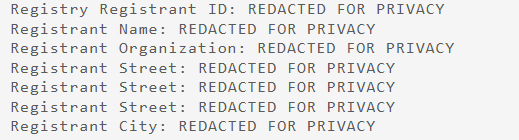
This is because most domain owners pay for a privacy service to keep their personal info, such as home address, phone number, and email off the public internet. It’s basically done to prevent spam.
However, this privacy setting does not apply to your registrar name. Even if your personal details are hidden, the company name of your registrar will always stay visible, so you can see exactly who you are registered with.
What if My Domain Registrar Is Still Hidden?
Sometimes, even after using a lookup tool, you might still feel a bit confused. This can happen if your domain is bundled with your website builder or if your personal details are redacted. If the registrar name you found doesn’t ring a bell, here are three ways I track down the source.
Log Into Your Hosting or Website Account
Many people buy their domain name when they set up their website. If you use a platform like Wix, Squarespace, or Shopify, your domain is likely managed right inside their dashboard.
Log in to your website builder and look for a tab labeled Domains or Manage Domain. Usually, these companies act as your registrar, so you can handle your renewals and DNS settings in the same place where you edit your site.
Check Your Email
Every single time you buy or renew a domain, the registrar is required by law to send you a confirmation. Search your email inbox for keywords like Domain Confirmation, WHOIS, or Registration.
Look for emails from common companies like GoDaddy, Namecheap, or Google. Even an old welcome email from years ago will tell you exactly which company holds your domain.
Check Your Bank Statement
If you still cannot find the login, your bank account will tell the truth. Go to your online banking and search your transaction history for “Domain” or “Registration.” You will likely see a small annual charge. The name of the company on that charge is your registrar. This is the most foolproof way to find out exactly who you are paying to keep your website address active.
What to Do After You Find Your Registrar
Now I don’t want you searching “Who is my domain registrar?” again. So once you know your registrar’s name, you need to take a few steps to make sure you actually own and control your digital asset.
Log In and Verify Access
Now that you know the company name (for example, GoDaddy), head to their website and try to log in. If you do not remember your password, use the “Forgot Password” link with the email address you most likely used. It is very important to confirm that you can access the dashboard before making any urgent changes to your website or DNS settings.
Update Your Contact Details
Inside your account, check your registrant contact information. I always make sure the email address on file is one I check regularly (most of us have more than 1-2 mails). If an old employee or your relative is still listed as the contact, change it to your own information ASAP. You do not want someone else to have a legal claim over your domain name.
Check Your Renewal Settings
If you don’t want to lose your domain, find and turn on that “Auto-Renew” button. Domains are easy to lose if a credit card expires or if you miss a notification email. Check the expiration date using a domain age-checker and confirm your current payment method is up to date.
Secure Your Account
Your domain is the front door to your business, so you must protect it. If your registrar offers Two-Factor Authentication (2FA), turn it on right away. I also check whether Domain Lock or Registrar Lock is enabled. This feature prevents anyone from transferring your domain to another company without your explicit permission.
Can I Change My Domain Registrar?
The short answer is yes. After doing so much digging, you might find out that you are not happy with the company currently holding your domain. In that case, you can easily change your registrar. It is a common process, and you are never stuck with one provider forever.
Understanding the Domain Transfer Process
Moving your domain from one company to another is called a domain transfer. To do this, you usually need to unlock your domain at your current registrar and get an authorization code. Then, you simply give that code to your new provider.
The whole process typically takes about five to seven days to complete. Once the transfer is finished, your new registrar will handle all your future renewals and settings.
When to Consider Switching
I usually look for a new provider if I notice a few specific red flags. If you are experiencing any of the following, it’s time to move your domain:
- High Pricing: Some companies offer a very cheap rate for the first year, but then double or triple the price when it comes time to renew. If you find yourself paying way more than the industry average, switching can save you a lot of money over time.
- Poor Support: When something goes wrong with your DNS or your website goes offline, you need help immediately. If your current registrar has slow email support or no live chat, it is a sign that they do not value your business.
- Lack of Control: I have seen some registrars make it very difficult to change simple settings like your name servers. If the dashboard feels clunky or if you feel like you do not have full control over your own asset, finding a more user-friendly registrar is the best move.
Conclusion
Honestly, 90% of the time I just use a quick WHOIS lookup to find registrar details. It is the fastest way to get an answer without digging through old files or trying to remember passwords from years ago. Whether you use the official ICANN tool or a site like DomainTools, the information is right there waiting for you.
If you haven’t checked your domain settings in a while, I suggest you do it now. It only takes a minute to confirm your registrar and make sure your contact email is current. Taking a moment to verify your registration today can save you a major headache when it’s time to renew your website next year.
Who Is My Domain Registrar FAQs
How do I find my domain registrar for free?
You can find your registrar for free by using the ICANN Lookup tool or Whois.com. These are public databases that do not charge any fee to view the registration details of a domain name. Simply enter your URL, and the registrar name will appear in the results.
How do I figure out who my DNS provider is?
While your registrar holds your domain name, your DNS provider is the company that manages where your web traffic goes. You can find this by looking at the Name Servers in a WHOIS report. If you see names like ns1.bluehost.com, then Bluehost is your DNS provider.
Can I find my registrar without logging in?
Yes. You do not need to log into any account to find out who the registrar is. Public tools like DomainTools allow anyone to see which company is managing a domain just by searching for the domain name itself.
What if I don’t have access to my domain?
If you cannot log into your registrar account, first try a password reset with your primary email. If that fails, you may need to contact the registrar’s support team directly and provide proof of identity or business ownership to regain access to your account.
Is a WHOIS lookup safe?
Yes, performing a WHOIS lookup is totally safe. You are simply viewing public records stored on a database. Using these tools does not harm your website or alert anyone that you are looking for that information.
Is GoDaddy a registry or registrar?
GoDaddy is a registrar. A registry is an organization that manages entire domain extensions (like .com or .org), while a registrar is the middleman that sells those individual names to the public.