
For many businesses, finding a website or email service suddenly inaccessible is a critical issue. This commonly results from domain name expiration.
A domain is not a purchase of ownership but a registration or lease for a set term. When the registrant fails to renew it on time, the domain expires. All associated services immediately stop functioning.
In this article, we will explain everything about the domain name expiration process, including why domains expire, the multi-stage expiration timeline, and crucial prevention strategies.
Understanding the domain lifecycle is very important for maintaining a stable online presence. Let's get started!
The Basics of Domain Ownership and Expiration
To understand domain name expiration, start with the basics: you don’t truly own your domain name. You lease or register it for a set period, which usually lasts anywhere from one to ten years.
The Lease Model
Think of a domain name registration as renting an apartment:
- You sign an agreement for a fixed term (the lease or registration period).
- During that term, you have exclusive rights to use the address.
- When the term is up, you must renew the lease, or the rights to the address return to the market.
When Services Stop
When the expiration date passes and the domain is not renewed, your online life immediately goes offline. All services associated with that domain will cease to function, which includes:
- Your website is becoming inaccessible (often replaced by a "parked" page).
- Your professional email is stopping (you can't send or receive messages).
- Any connected online applications or services are breaking down.
Key Players in the Domain World
Understanding the three main parties involved makes it easier to manage your domain effectively:
- Registrant: The user or organization that registers the domain (you).
- Registrar: The company you work with (e.g., GoDaddy, Cloudflare, and so on) to buy and manage the domain. They handle all the sales and renewal processes.
- Registry: The organization that manages the master database for a specific top-level domain (TLD), such as Verisign for the .com TLD. They maintain the official record of all registrations.
The Domain Name Expiration Timeline: What Happens Next?
When a domain name expires, it doesn’t disappear right away. Instead, it goes through several stages outlined by the Internet Corporation for Assigned Names and Numbers (ICANN). This process keep things fair and gives the original owner multiple chances to renew or reclaim their domain.
| Stage | Duration (Typical) | Status & Cost for Registrant | Risk to Registrant |
| Grace Period | 1 to 45 days | Can renew at the standard renewal price. | Domain may be listed on aftermarket or auction by the Registrar. |
| Redemption Period | 30 to 45 days | Can renew, but must pay standard renewal price PLUS a significant redemption fee. | High-value domains may be sold at auction; retrieval is complex and expensive. |
| Pending Delete | Approximately 5 days | Cannot renew or recover. | Domain is guaranteed to be released to the public market soon. |
| Release | Immediately after Pending Delete | Can attempt to re-register (buy it back) if nobody else does first. | Domain becomes available to the public and is often instantly snatched up by buyers or backorder services. |
1. Grace Period (Typically 1–45 Days)
The moment after the official expiration date, the domain enters the grace period. While your website and email services are immediately disabled, you (the original registrant) still have a window of time to renew the domain at the regular, standard renewal price without penalty fees.
It's necessary to act now as some registrars put the domain up for auction during this phase.
2. Redemption Period (Typically 30–45 Days)
If the domain remains unrenewed after the grace period, it enters the redemption period. At this point, the domain leaves the registrar's direct control and returns to the Central registry.
You can still recover your domain, but it comes at a very steep cost. You must pay the standard renewal fee plus a substantial, non-refundable redemption fee (sometimes called a restore price) set by the Registry. This process is time-consuming and expensive.
3. Pending Delete (Approximately 5 Days)
After the redemption period, the domain status changes to 'Pending Delete'. You can no longer recover or renew the domain at this stage. The domain is frozen for about five days before being released back into the public pool.
4. Release and Re-registration
Now once the pending delete phase ends, the domain is officially dropped and becomes an unregistered domain. It is available for immediate registration by the general public on a first-come, first-served basis.
Savvy individuals and automated systems known as "domain backorder services" often track these release dates and attempt to snatch up desirable domains instantly.
Note: This timeline applies primarily to TLDs governed by ICANN (like .com, .net, .org). Country Code TLDs (ccTLDs) may have their own unique, and often much shorter, expiration processes.
Why Domains Expire (The Causes)
Domain names expire due to a combination of regulatory requirements and administrative oversights by the registrant. Losing control of a valuable domain is almost always preventable if you know the causes of expiration beforehand.
Here are the primary causes:
1. ICANN Regulations and Policy
The Internet Corporation for Assigned Names and Numbers (ICANN) mandates that domains cannot be owned indefinitely.
- Preventing Hoarding: This system ensures that domains that are no longer in active use go back to the public market. It promotes fairness and keeps domain names available to everyone, preventing individuals or companies from buying and holding domains off-limits forever.
2. Failed Auto-Renewal
This is the most frequent cause of accidental expiration, even when the registrant intends to keep the domain.
- Outdated Billing Information: If the credit card linked to the auto-renewal feature expires or is lost and replaced, the renewal payment will fail. The registrar cannot process the charge, leading to expiration.
- Auto-renewal Disabled: The registrant may have manually switched off the auto-renewal setting, relying alone on email reminders, which are usually missed.
3. Missed Renewal Reminders
Registrars are required to send multiple email notifications warning of an upcoming expiration (often 30 days, 7 days, and 1 day prior). However, these reminders are usually missed because:
- They are sent to an outdated email address listed on the domain's registration record.
- The email is automatically routed to a spam or junk folder and goes unseen.
- The registrant receives too many emails and misses the notification.
4. Registrar Issues (Rare)
Although pretty uncommon, domain name expiration can sometimes be due to the service provider. Technical errors, glitches in the registrar's system, or policy changes can disrupt the renewal process and cause a domain to expire.
How to Check Your Domain's Expiration Date
Now that you know the domain name expiration causes, it's time to learn how to check the domain expiration date.
Preventing an accidental expiration is simple, but it relies on knowing the exact renewal date. Fortunately, there are two reliable methods to check your domain's expiration status:
1. Check Your Registrar Dashboard
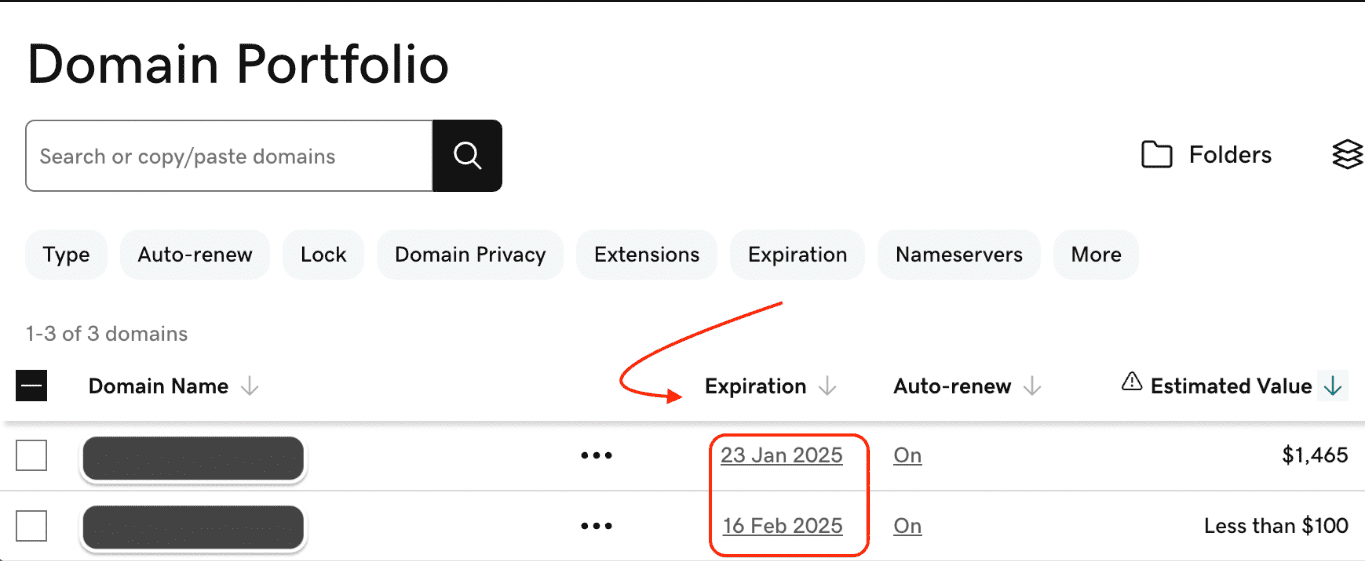
GoDaddy domain expiration date
If you are the current registrant, the easiest and most direct method is to log into your account with the company where you registered the domain.
- Log in to your domain registrar's website (e.g., GoDaddy, Namecheap, Cloudflare).
- Go to the Domain Management or My Domains section.
- The expiration date is clearly listed next to each domain name you manage. You can also often find the renewal status (Auto-renewal On/Off) here.
2. Use a WHOIS Lookup Tool
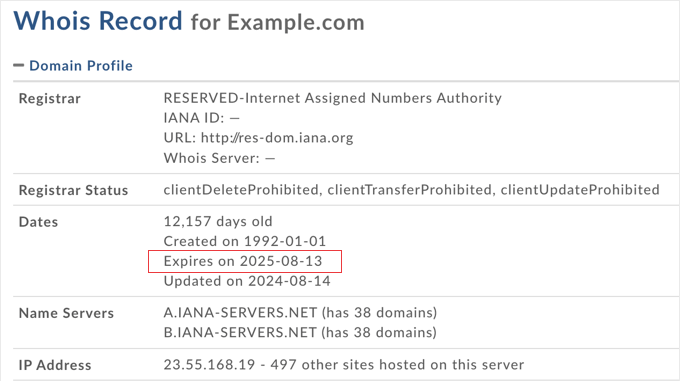
Domain expiration date using WHOIS lookup services
The WHOIS database is the publicly searchable directory that contains registration data for nearly all domains. This method works for both your own domains and any domain you are tracking for potential acquisition.
- Visit any reputable online WHOIS lookup service (many registrars offer this, or use ICANN's official tool).
- Type the domain name you wish to check into the search bar.
- In the results, look for the field labeled "Registry Expiry Date," "Expires On," or similar. This date is the absolute deadline for the registration term.
Note: Due to privacy regulations (like GDPR), some personal contact information of the registrant may be hidden or anonymized in the public WHOIS results, but the official expiration date is almost always still visible.
How to Protect Your Domain from Expiring (Prevention Steps)
Losing a domain name is a completely avoidable event. Use the following strategy to save yourself from the risk of domain name expiration.
1. Optimize Your Renewal Settings
This is the most important defense against accidental domain expiry.
- Enable Auto-Renewal: Always check the automatic renewal feature is active for all your critical domains. This sets up your registrar to automatically bill your payment method and renew the domain before the deadline.
- Keep Payment Information Current: Proactively check and update the credit card or billing details associated with your registrar account, especially if a card is near its expiration date. A failed payment is the number one cause of unexpected expiration.
- Renew for Multiple Years: Whenever you can, extend your high-value domains for the longest term allowed (usually 5 to 10 years). This way, you won’t have to renew as often and you’ll lower the risk of accidentally missing a renewal.
2. Maintain Accurate Contact Information
Renewal reminders are useless if they go to the wrong inbox.
- Update WHOIS Data: Ensure the administrative and billing email addresses listed in your domain's WHOIS data are current and monitored regularly, preferably by a dedicated team or individual.
- Use Secondary Contact Methods: Provide a secondary email address or phone number that is not linked to the domain itself (e.g., a personal email, or a phone number for the principal owner). If the domain expires, your business email will fail, making a non-domain contact method essential for recovery.
- Whitelist Registrar Emails: Add the official email addresses of your domain registrar to your safe sender list to prevent critical renewal notices from going to the spam folder.
3. Implement Domain Portfolio Management
For businesses with multiple domains, centralization and review are very important to prevent domain name expiration.
- Consolidate Registrars: If you manage domains across multiple registrars, consider transferring them all to one trusted provider. This consolidates renewal management, billing, and technical support into one dashboard.
- Use an External Reminder System: Set calendar reminders and alerts outside of your registrar's system. An independent reminder, set 60 and 30 days before the expiration date, acts as a necessary backup.
- Use Domain Expiration Protection: Some corporate registrars offer specialized "Domain Expiration Protection" or "Restore" services. These features can extend the grace period or simplify the recovery process in case of failure.
Conclusion
Domain name expiration is the biggest threat to your brand and SEO rankings. Your best defense is a simple, triple-layer strategy: use auto-renewal, keep your contact details updated, and enable a Registrar Lock.
The moment a domain expires, it enters a high-stakes market. Professional investors use tools like DomCop to instantly find and analyze dropped names. DomCop provides over 90 critical metrics, from backlinks to Moz authority, so buyers know exactly how much value they are acquiring. Do not let your asset become their next profitable discovery. Keep your portfolio secure.
Domain Name Expiration FAQs
How long does a domain name expire?
A domain's registration period is typically between one and ten years. Once the registration term ends, it enters an expiration cycle that can last 60 to 90 days before it is finally released to the public.
How to find out when a domain name will expire?
The easiest way is to check your domain registrar's account dashboard or use a public WHOIS lookup tool. These tools display the official creation and expiration dates for nearly any registered domain.
Are there any 4 letter .com domains left?
All four-letter combinations using only the 26 letters of the English alphabet (e.g., LLLL.com) have been registered. You must look to the aftermarket or consider names that include numbers, dashes, or use different domain extensions (TLDs).
What happens if I don't renew my domain?
Your website and email services will stop working immediately. You then enter a Grace Period and later a costly Redemption Period before the domain is deleted and released for others to register or purchase at auction.