 DomCop
For many businesses and individuals, a domain name is the foundation of their online identity. Forgetting to renew it can feel like locking yourself out of your own digital home.
Once a domain expires, your website goes offline immediately, and your email stops working. It’s a stressful situation that requires swift action.
Fortunately, domain expiration is not usually the end of the line. Most registrars offer a specific period where you can still reclaim your domain.
This article breaks down exactly what happens after a domain expires, guides you through the renewal process, and shows you how to prevent this costly lapse from happening again.
Common Reasons Why Domains Expire
Domain expiration results from a simple oversight, but the consequences can be big for you. Understanding the root causes can help you avoid them in the future:
- Non-Renewal: This is the most frequent cause. It typically happens when the domain owner intended to renew manually but missed the deadline. Often, this is because renewal notices from the registrar were sent to an old, unused, or unchecked email address.
- Failed Auto-Renewal: You might have auto-renewal enabled, but the payment still fails. This occurs when the credit card on file has expired, the billing details are outdated, or there are insufficient funds.
- Incomplete Domain Transfer: If you attempted to transfer your domain to a new registrar but the transfer wasn’t completed and confirmed before the original expiration date, the domain may lapse.
- Registrar Issues or Holds: In very rare situations, technical errors at the registrar or a domain being placed on hold (due to a legal dispute or policy violation) can prevent a successful renewal until the underlying issue is resolved.
The Domain Life Cycle After Expiration
Can you renew a domain after it expires? Yes, absolutely, but you must act quickly. Once the expiration date passes, your domain enters a series of phases where the cost and difficulty of recovery increase sharply.
The moment your domain expires, two things happen immediately: your website and all associated services (like email) stop functioning, and the domain is placed in a locked status, preventing any changes until it is renewed.
The Grace Period (Your First Chance to Renew)
After expiration, most Generic Top-Level Domains (gTLDs) such as .com, .net, and .org enter a Grace Period that typically lasts about 30 days.
During this period, the domain is put on hold, but the original owner can usually renew it through the registrar at the regular, standard rate. This is your easiest and cheapest chance to reactivate the domain.
However, if you fail to renew within this window, the domain may be listed for auction or proceed to the next stage….
The Redemption Grace Period (RGP)
If the domain is not renewed during the standard Grace Period, it often enters the Redemption Grace Period (RGP), which usually lasts an additional 30 days (sometimes longer).
At this stage, the domain has been dropped by the registrar and moved to the registry. While you can still recover your domain, it requires a special restoration process and involves paying a high Redemption Fee (which can be over $100) on top of the standard renewal cost.
This is the last, most expensive window for the original owner to reclaim the domain.
Pending Delete and Release
If the domain is not reinstated from the Redemption Grace Period, it enters the Pending Delete status for 5 days. During this final countdown, the domain is locked, and no one—not the owner, the registrar, or a new buyer—can renew or register it.
On the 6th day, the domain is finally released to the public for re-registration on a first-come, first-served basis. This is where you permanently lose the ownership.
For gTLDs, this process typically results in the domain becoming publicly available about 70–80 days after the initial expiration.
Key Exceptions for Country Code TLDs (ccTLDs)
It is crucial to note that many Country Code TLDs (ccTLDs) follow much stricter, non-standard rules.
For example, domains like .CH, .ES, .FR, and .COM.AU must be renewed 12 days prior to the actual expiration date, while .CX, .DE, .EU, and .NL domains must be renewed 5 days prior.
Most critically, .CM domains are sent for deletion and released for re-registration on the same day right after expiration. Always check the specific rules for your TLD.
How to Renew an Expired Domain
If your domain has expired, the first step is to immediately contact your registrar or check your account dashboard. If you are unsure who your registrar is, you can do a WHOIS search at whois.icann.org.
Here are the specific steps for renewing an expired domain on some of the most popular platforms:
How do I renew my expired GoDaddy domain?
To renew an expired GoDaddy domain, you must do so before it is removed from your account. Be aware that domains in the Redemption Grace Period will include a redemption fee.
1. Sign in to your GoDaddy Domain Portfolio.
2. Select your expired domain to access the Domain Settings page.
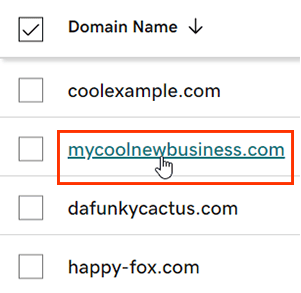
Renewing expired domains on GoDaddy
3. Look for the Renew Now option, usually located on the “Renew” card.
4. Choose your desired renewal period and select Continue.
5. Complete the payment process at checkout. (You can also opt to turn on Auto-renew here.)
Renewing Expired Domains on Namecheap
Namecheap consolidates all expired and expiring domains into a specific section for easy recovery:
1. Sign in to your Namecheap account and select Expiring/Expired from the left sidebar menu.
2. Find the expired domain name you wish to keep and add it to your Shopping Cart.
3. Click the View Cart button, then the Confirm Order button, and proceed with the checkout process to complete the payment.
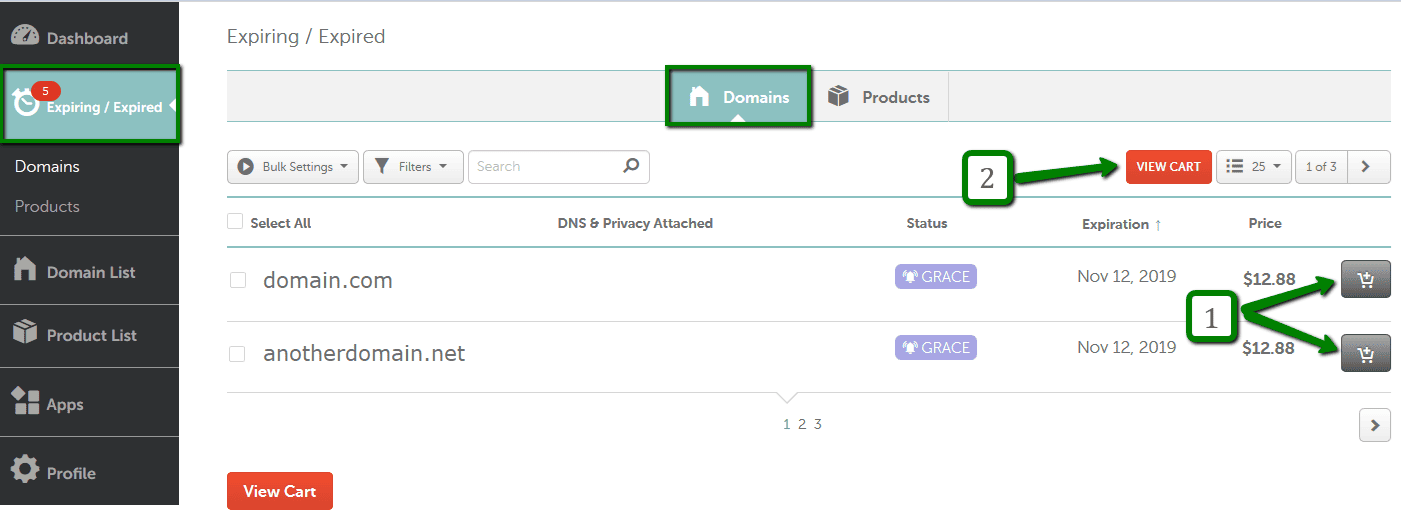
Renewing expired domains on Namecheap
Renewing Expired Domains on Hostinger
Hostinger uses the hPanel dashboard to manage expired domains:
1. Log in to hPanel and navigate to the Domains section.
2. Check the domain’s status:
If in Grace Period: Hover over the status to see the time left. Click the Renew button and complete the regular renewal payment.

Renewing expired domains on Hostinger during grace period
If in the Redemption Period, the status will indicate this. Click the Renew button, and the payment will cover both the renewal cost and the additional redemption fee.
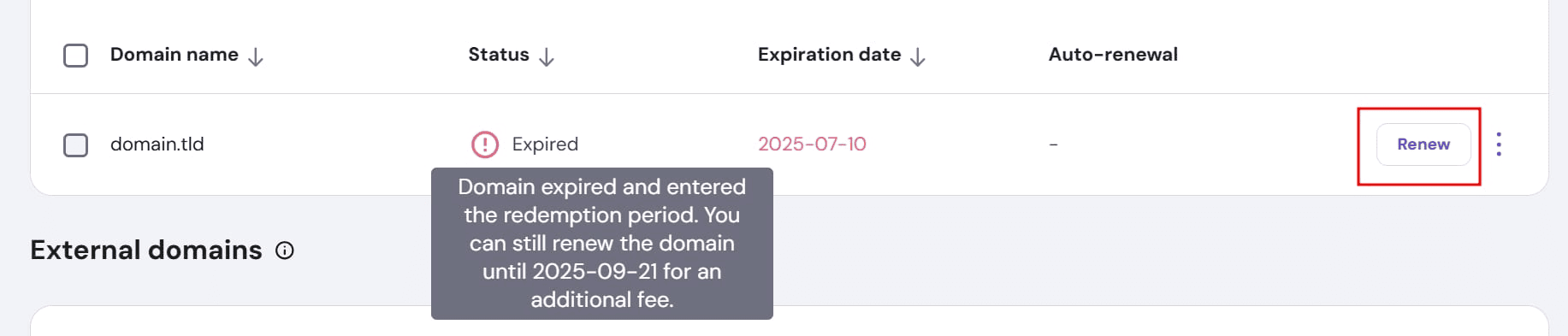
Renewing expired domains on Hostinger during redemption period
3. Allow up to 24 hours after successful payment for the domain to be fully reactivated.
Renewing Expired Domains on Name.com
The process on Name.com is straightforward for expired domains:
1. Log into your Name.com account.
2. Hover over Domains on the top of the page and click Renew Domains.
3. Under the Expired Domains section, click the Renew button next to the name you want to recover.
4. Click the Shopping Cart icon and follow the instructions to complete the order.
What are the Penalties or Risks of Forgetting to Renew?
What happens if I forgot to renew my domain? The consequences of an expired domain go far beyond just an offline website. They carry financial, reputational, and operational risks:
1. Immediate Loss of Traffic and Functionality
Your website and all associated services (like email) cease to function immediately. Visitors will see a “parked” page or an error, resulting in lost traffic and potential sales.
Any email addresses associated with the domain stop working, causing you to miss critical communications from customers, partners, and vendors.
2. Loss of SEO Authority
Search engines, like Google, view prolonged downtime as a sign of unreliability. Your website’s pages will begin to drop in search results, leading to a steep decline in organic traffic.
All the search engine optimisation (SEO) authority, “link juice,” and backlinks you built up over the years can go dormant or be lost, making the process of recovering your previous search rankings lengthy and costly.
3. Financial Costs
If you miss the standard grace period, recovering the domain requires paying a high Redemption Fee (which can exceed $100) in addition to the regular renewal cost.
The greatest financial risk is losing the domain completely and being forced to negotiate a buyback from a new owner (a domain squatter or competitor) at a potentially astronomical price.
4. Loss of Ownership and Brand Damage
Once the domain is publicly released, anyone (including your competitors or cybercriminals) can register it on a first-come, first-served basis.
A new, malicious owner could use the domain for inappropriate content, phishing, or simply to redirect traffic to a competitor. This can instantly and severely damage your brand reputation and customer trust.
Can I Get Penalized for Using an Expired Domain?
If you are buying an expired domain that was previously owned by someone else, there is a risk of inheriting the former owner’s negative baggage. This is a form of passive penalty:
- Search Engine Penalties: The domain may have been penalized by Google for previous spammy practices (e.g., toxic backlinks, keyword stuffing). If you don’t clean it up, your new site could inherit this penalty.
- Irrelevant History: The existing backlinks may be entirely irrelevant to your new business, making the inherited SEO value worthless or even harmful.
How to Prevent Your Domain from Expiring
To permanently secure your domain:
1. Enable Auto-Renewal: Set up automatic renewal using a valid payment method.
2. Update Billing: Keep your payment information (e.g., credit card) up to date and valid.
3. Update Contact Email: Ensure the email address on file is always active and monitored.
4. Monitor Notices: Regularly check email (including spam) for renewal warnings.
Conclusion
Losing a domain name is a stressful, costly mistake that can damage your business and SEO. While you have a short window, aka the Grace Period, to easily renew an expired domain, acting quickly is essential to avoid hefty Redemption Fees and the risk of permanent loss.
The simplest solution is proactive prevention: enable auto-renewal and keep your contact and billing information up to date. If you are looking to acquire a high-value, previously expired domain for a new project, Domcop can help.
DomCop allows you to search for recently dropped and expired domains with strong backlink profiles and authority, turning a potential loss into a strategic opportunity.
Renewing Expired Domains FAQs
What is the domain Redemption Grace Period?
The Redemption Grace Period (RGP) is a phase following the standard 30-day grace period, typically lasting another 30 days. During the RGP, the original owner can still reclaim the domain from the registry, but it requires a special restoration process and an additional fee.
Why is the redemption fee so high?
The redemption fee is high because it is a charge set by the domain registry, not the registrar, designed to encourage timely renewal. It covers the administrative costs and steps required to retrieve the domain from a fully expired status before it is released to the public.
How do I renew .CH / .ES / .FR / .LI / .PE / .SG / .AU domain?
These country-code TLDs have specific rules and must be renewed at least 12 days before the actual expiration date. If this deadline is missed, the domain typically enters the Redemption Grace Period immediately.
How do I renew .CX, .DE, .EU and .NL domains?
These domains must be renewed manually or auto-renewed at least 5 days before the expiration date. Renewing on time is essential to prevent the domain from being placed into the Redemption Grace Period early.
How do I renew expired .CX, .DE, .EU and .NL domains?
Since these domains may enter the Redemption Grace Period (RGP) quickly if the 5-day deadline is missed, you must contact your registrar’s support team immediately. They will assist you with the necessary steps to try to restore the domain.
How to renew an SSL certificate?
While SSL renewal is typically managed through your control panel, you can often purchase a renewal SSL certificate during the domain renewal/reactivation process by selecting the certificate from the suggested add-on items.