
Navigating expired domains offers serious opportunities for SEO and digital marketing. Once you buy an expired domain, you face a key decision: should you rebuild it or redirect it? I'll help you with that.
In this guide, I’ll walk you through both strategies step by step. You’ll also get tool recommendations, expert tips, and a phased plan you can apply today.
Expire Domain Audit: Your Starting Point
It’s common practice to audit a domain before purchasing to check for spam and see if it has relevant Trust Flow and Citation Flow. But once you’ve purchased an expired domain you should perform an audit to understand the contents of the domain you purchased.
Here are some tools and tips on how to perform this audit. Bear in mind this is a lengthy process that can take anywhere between 1 to several weeks. But it's important to be thorough so that you can set your expired domain up for success.
Tools for the Audit
- Screaming Frog SEO Spider – Crawl all URLs of the expired domain. Use it to spot broken links, duplicate content, or leftover pages you don’t want.
- Ahrefs (or similar backlink tools) – Examine the backlink profile, referring domains, anchor text, and the strength of those links.
- Wayback Machine / Archive.org – Look at historical snapshots of the domain to see what it used to host (blogs, news, e-commerce, etc.).
- Manual sitemap / URL inspection – Compare the URLs still indexed in Google Search Console or site:domain.com searches and check whether those resources are still valid.
Steps in Domain Audit
- Decide whether any original pages merit resurrection. If many pages still receive traffic or backlinks, preserving them may help.
- Consider merging old URLs to new ones. If you have multiple legacy pages, you might consolidate them into relevant existing content.
- Plan redirections carefully. Decide whether each old URL should redirect to a category page, blog post, or homepage.
- Check for penalties or de-indexing signals. Use Google Search Console (if you can verify ownership) or look for drop-offs in organic traffic historically.
By the end of the audit, you should know which URLs are worth preserving, which to ditch, and whether the domain’s past is clean enough to build on.
Redirecting: When and How
Redirecting means sending all (or a portion) of the old domain’s URLs to another domain. It’s tempting because it seems faster. Yet it only works well under certain conditions.Nevertheless, we’ll share when redirects are actually useful, as recommended by Ian Howells, SEO guru and Partner at Traffic Think Tank.
When to Redirect
Redirecting can make sense when:
- The expired domain was once a strong, recognized business in your niche.
- It aligns closely with your brand or a keyword you care about.
- It has a strong backlink profile still intact.
- The content formerly on it is topical and relevant to your main site.
If the domain’s past content was totally unrelated, redirecting may hurt more than help.
Best Practices for Redirecting
- Use 301 (permanent) redirects, not 302s, to pass link equity.
- Match pages carefully: legacy URLs ≈ the same topic or area on your main site.
- Avoid redirect chains (A → B → C). These confuse search engines and degrade link value.
- Test before you go live to catch any loops or broken redirects.
- Monitor traffic shifts after redirection to spot unexpected drops.
One academic study of large-scale redirection across the web found that about half of redirect chains lead to errors or dead ends, emphasizing how easily redirections can break down.
Rebuilding: The Safer, Stronger Route
If redirecting feels too risky, rebuilding gives you full control. Rebuilding means reviving the domain as its own site (or integrating it later), with content, SEO, and authority.
Why Rebuild
- You can detect and repair any penalty before launching.
- You maintain flexibility to build as a PBN (private blog network), niche site, or eventual merger into your primary site.
- You can monetize it independently (ads, affiliate content) or recoup costs.
- Rebuilding avoids heavy SEO penalties that poorly planned redirects can trigger.
How to decide to rebuild or redirect?
The following decision tree will help you quickly evaluate if you should redirect or rebuild your expired domain.
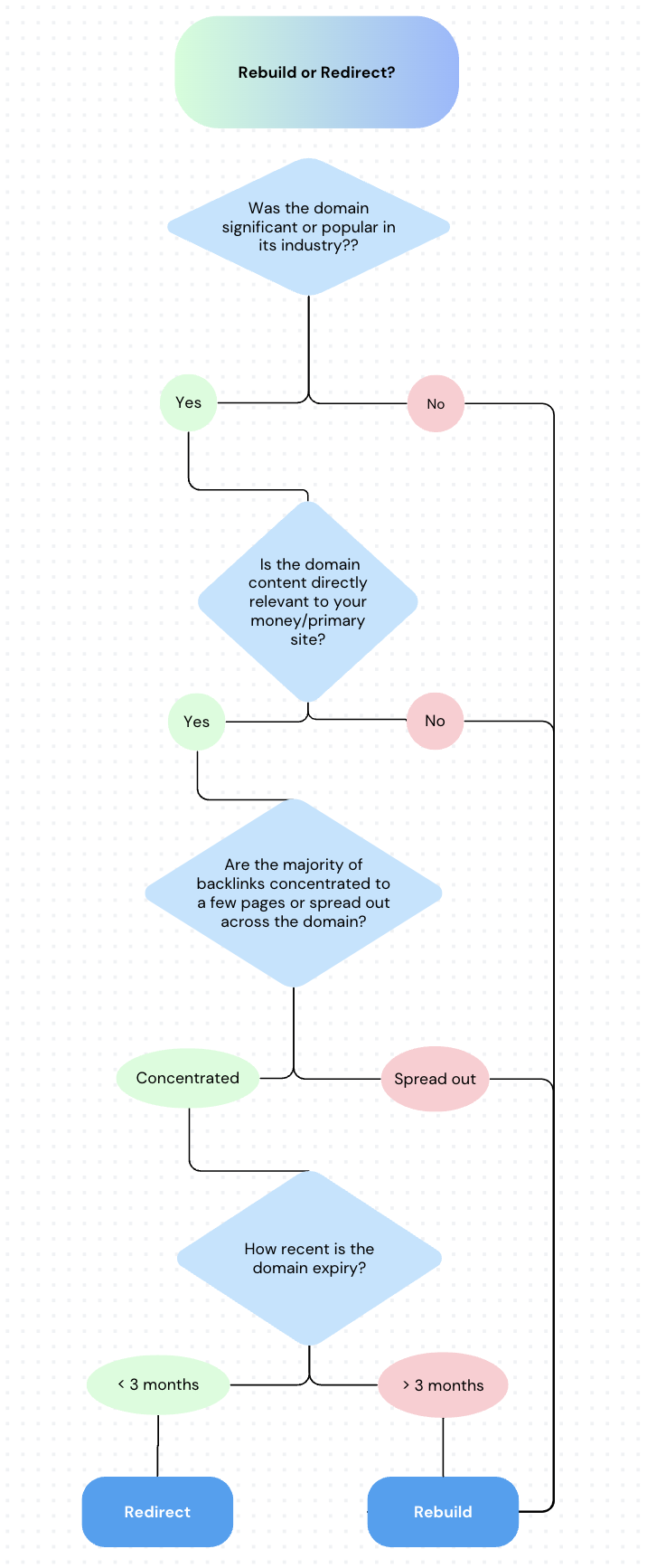
If you're still confused between the two, here's a quick decision guide:
- If the domain’s content closely matches your niche, lean toward redirecting.
- If it contains spam or irrelevant content, rebuilding is safer.
- If you want long-term control and monetization, rebuild.
- If your main site is already strong, a smart redirect may press the domain’s value into your core site.
Phased Rebuild Approach for Seamless Integration
If you’ve chosen to rebuild your expired domain, you should commit to the phased approach. This helps leverage the maximum value from your expired domain and reduces the risks of being penalized by Google or marked as spam. This is a long process but the investment will be worth it in the end.
Steps for Phased Rebuild:
1. Soft Relaunch
- Ensure the domain is penalty-free (check in Search Console or monitor indexing behavior).
- Host it separately. Don’t rush to point name servers to your main site.
- Publish a few high-quality content pieces tied to the domain’s history.
2. Content Enrichment & Backlink Growth
- Gradually add blog posts, pillar content, or resource pages relevant to the domain’s past.
- Build backlinks to the domain independently.
- Reclaim any broken backlinks pointing to the legacy domain (contact webmasters, use 404 reclamation).
3. Full Integration (after 9–12 months)
- Once the domain has regained strong signals, integrate it into your primary site.
- Use 301 redirects selectively from the expired domain into related content on your core domain.
- Monitor for traffic drops, indexing issues, or crawl anomalies.
Risks and Legal Considerations
While expired domains offer valuable SEO opportunities, they come with risks that can seriously affect your site’s performance and legal standing.
Trademark issues
If the expired domain contains a registered brand or product name, using it can lead to a lot of legal disputes. Always check trademarks before rebuilding or redirecting.
Spam history
Some expired domains were used for link farms or black-hat SEO. These may carry penalties that prevent ranking. Run checks with Ahrefs, SEMrush, or Google’s Transparency Report before investing.
Redirect misuse
Redirecting unrelated pages to your homepage or forcing irrelevant redirects looks unnatural. It can hurt rankings and user experience. Only redirect when content relevance makes sense.
Redirect chains
Long or broken redirect chains reduce link equity and traffic. Always use direct 301 redirects to the most relevant destination and test them with Screaming Frog or Redirect Checker.
Conclusion
Expired domains can be valuable assets if managed carefully. They offer backlinks, authority, and potential traffic, but only when you audit them thoroughly and understand their history.
Redirecting works best for domains closely aligned with your site, while rebuilding gives more control and monetization options. Always check for trademark issues, spam penalties, and avoid irrelevant redirects or chains that can hurt SEO.
Be warned – instantaneously redirecting an expired domain might seem tempting, but it’s not always the safest bet.